D. Structures and Mechanisms · Systems in ActionAutomating Systems: Code, Benefits and Costs
D1.1 D1 A2.1 A2.2About 50 minutes
Learning goals- I can explain what an automated system is and identify its sensors, controller and actuators.
- I can write and test code that models an automated system.
- I can assess the social, economic and environmental impacts of automating a system.
- I can describe impacts of emerging technologies like artificial intelligence on everyday life and skilled trades.
Words to know
automation
Using machines, sensors and computer code so a system does a task with little or no human control.
sensor
A device that detects something, like light, weight, motion or temperature, and sends a signal.
controller
The "brain" of an automated system: a computer or microcontroller that runs code to decide what to do.
actuator
A part that does the action the controller chooses, like a motor, a pump, a light or a valve.
algorithm
A set of step-by-step instructions to solve a problem or do a task.
artificial intelligence (AI)
Computer systems that can do tasks that normally need human thinking, like recognizing images or speech, often by learning from large amounts of data.
Hook: the recycling plant that sorts itself
When your blue bin is collected, everything arrives mixed together at a recycling facility. In many facilities, much of the sorting is now automated. Conveyor belts carry the items past magnets that lift out steel cans, machines that push aluminum cans off the belt, and optical sorters that recognize types of plastic and blow them into the right bin with puffs of air. People still check and remove items that do not belong.
This is an automated system: sensors, a controller running code, and actuators working together, with people supervising.
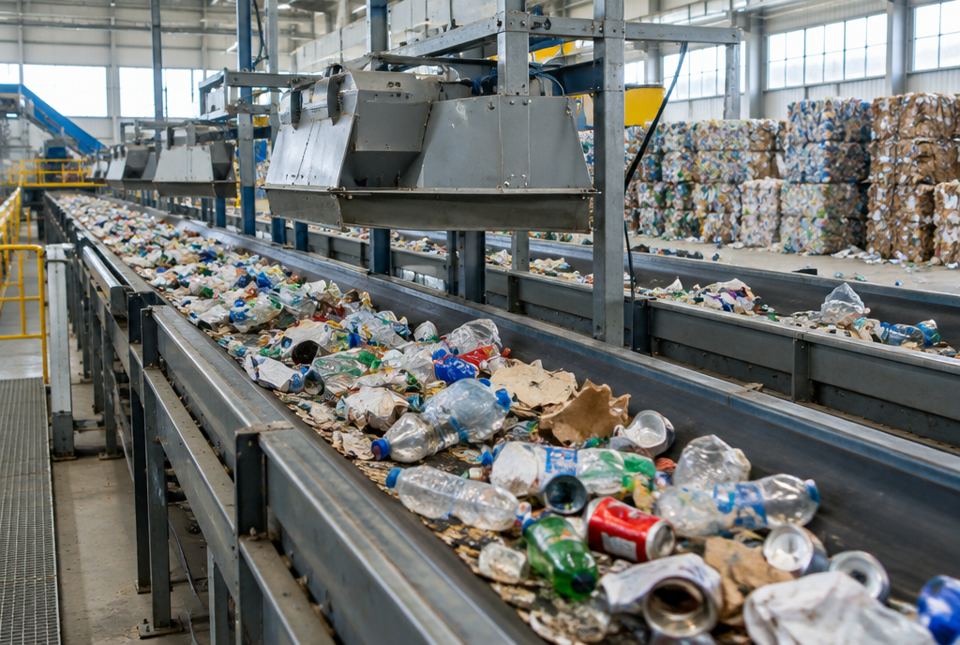 Machines above the belts help sort the recycling automatically. Notice the bales of sorted material stacked in the background. AI-generated image
Parts of an automated system
- Sensors collect information (Is the item metal? What kind of plastic? Is a car waiting at the light?).
- A controller runs code (an algorithm) that decides what to do.
- Actuators do the action (a motor moves a belt, an air jet fires, a light turns green).
- Feedback checks the result and adjusts.
Examples of automated systems: traffic lights with sensors, automatic doors, smart thermostats, robotic vacuums, self-checkouts, automated warehouse robots, robotic milking systems and automated car washes.
# Recycling sorter model
repeat for each item on the conveyor belt:
read metal_sensor
read optical_sensor
if metal_sensor says "magnetic":
magnet lifts item into STEEL bin
else if metal_sensor says "metal, not magnetic":
pusher moves item into ALUMINUM bin
else if optical_sensor says "plastic":
air jet blows item into PLASTIC bin
else if optical_sensor says "paper":
item continues to PAPER bin
else:
stop belt and call a worker to check the item
add 1 to count for that bin
A plan (algorithm) for an automated recycling sorter (A2.1). Sensors give information, the code decides, and the actuators (magnet, pusher, air jet, belt motor) act. Notice the last choice: when the system is unsure, it asks a person.
Assessing the impacts of automation (D1.1)
Automation can change a system in many ways. When you assess an automated system, look at three kinds of impact:
| Kind of impact | Possible benefits | Possible costs |
|---|
| Social | safer work (machines do dangerous, heavy or repetitive jobs); convenience; services 24 hours a day; accessibility (automatic doors help people who use wheelchairs or walkers) | some jobs disappear or change; less human contact; people need new skills; privacy concerns when systems collect data; problems when systems fail or make mistakes |
| Economic | higher productivity; lower costs per product; new jobs designing, programming and repairing machines | machines are expensive to buy and maintain; workers may need retraining; small businesses may not afford it |
| Environmental | precise use of resources (for example smart irrigation waters only when soil is dry; better sorting means more recycling) | machines and data centres use energy; electronic waste; mining materials for electronics |
Worked exampleLet's assess automating a school library checkout
A school wants to replace its library desk with self-checkout stations that scan book barcodes. Assess the social, economic and environmental impacts and make a recommendation.
- Social: students check out books faster with no line; the librarian has more time to help students find books and teach research skills. But younger students may need help, and some students enjoy talking with the librarian at the desk.
- Economic: the stations cost money to buy and maintain; the school saves staff time at the desk.
- Environmental: the stations use a small amount of electricity; receipts could be emailed instead of printed to save paper.
- Recommendation: install one self-checkout station and keep the librarian available. Collect feedback after a term.
A balanced assessment names benefits and costs in all three areas, then recommends a solution that keeps the benefits and reduces the costs.
Emerging technologies and AI (A2.2)
Artificial intelligence is being added to many automated systems. AI can recognize objects in camera images, understand speech, predict when a machine will break down, and help vehicles assist drivers. Some vehicles that drive themselves are being tested.
In skilled trades, AI and automation are changing the work: technicians use diagnostic computers to find faults in vehicles and furnaces, and industrial electricians and industrial mechanics install and maintain robots and automated lines. These jobs need both hands-on skills and an understanding of code and sensors.
AI systems can make mistakes and can be unfair if they learned from biased data, so people need to check their decisions, especially when safety is involved.
Just for funA coder is asked: "Please go to the store and buy a carton of milk, and if they have eggs, get six." The coder comes home with six cartons of milk. Moral: computers do exactly what the code says, not what you meant.
Hands-on activityCode an automated system
You need: a computer or tablet with a free block-based coding tool such as Scratch (scratch.mit.edu), or paper and pencil.
Choose one system to automate: a crosswalk signal, a porch light, a greenhouse watering system or the recycling sorter.
- List the sensors (inputs), the actuators (outputs) and the rules (if... then...).
- Write the algorithm in plain steps first.
- Code it. In Scratch you can simulate a sensor with a variable. For example, for the sorter, set a variable item to a random number from 1 to 4 (1 = steel, 2 = aluminum, 3 = plastic, 4 = paper), then use if... then... else blocks to make a sprite say which bin it goes to and add 1 to a counter for that bin. Repeat 20 times.
- Run your code and test it. Does every possible input go somewhere sensible? Add a rule for an unknown item.
- Write two sentences assessing one social, economic or environmental impact of automating this system in real life.
What to look for: code that runs, uses a loop and if/else decisions, and handles an unexpected input. Example for a porch light: forever: if light sensor says dark and motion sensor detects motion, turn light on, wait 60 seconds, turn light off.
Your turn
Using machines, sensors and code so a system does a task with little or no human control.
2Name the three main parts of an automated system.
Sensors (collect information), a controller running code (decides) and actuators (do the action).
3In an automatic door, what is the sensor and what is the actuator?
Sensor: a motion or presence sensor that detects a person. Actuator: the motor that opens and closes the door.
4Give one social benefit and one social cost of self-checkouts in grocery stores.
Benefit: shorter lines or service with fewer staff at quiet times. Cost: fewer cashier jobs, less human contact, harder for some people to use.
5Give one environmental benefit of an automated greenhouse watering system.
It waters only when the soil is dry, so it saves water (and the energy used to pump it).
6Why did the recycling sorter code stop the belt for unknown items?
So a person can check the item. It is safer and keeps the sorted materials clean; automated systems need a plan for unexpected inputs.
7Name one way AI is changing a skilled trade.
Examples: automotive service technicians use computer diagnostics that suggest likely faults; industrial mechanics maintain robots and systems that predict when parts will wear out.
More practice: warm-up
A set of step-by-step instructions to solve a problem or do a task.
A part that does the action, like a motor, pump, light or valve.
3Name two automated systems in a home.
Any two: thermostat, dishwasher or washing machine cycles, robotic vacuum, motion-sensor light, automatic garage door.
5Which kind of sensor could tell a traffic light that a car is waiting?
A vehicle sensor, such as a camera or a sensor loop in the road.
More practice: on your own
1Write an algorithm for an automated crosswalk signal that has a push button and gives people 20 seconds to cross.
Example: forever: wait until the button is pressed. Wait until the traffic light can safely turn red. Turn traffic red. Show WALK for 20 seconds (with a sound for people who are blind or have low vision). Show flashing DON'T WALK with a countdown. Show DON'T WALK. Turn traffic green.
2Assess the economic impacts of a dairy farm installing robotic milking systems.
Benefits: fewer hours of labour, cows milked when they choose, which some farmers find increases milk output, and data on each cow's health. Costs: robots are very expensive to buy and maintain, need reliable electricity and internet, and staff must learn to manage them.
3A city automates its snowplow routes with GPS tracking and an online map showing where plows have been. Name one social, one economic and one environmental impact.
Social: residents can see when their street will be cleared and plan. Economic: routes can be planned more efficiently, saving fuel and staff time (but the system costs money). Environmental: less fuel burned and possibly less salt if sensors guide spreading.
4Why is it important for people to check decisions made by AI systems?
AI can make mistakes or be unfair if it learned from biased or incomplete data. When safety, health or people's rights are involved, a person must review the decision.
5Find the bug: if temperature > 30, turn fan on. The fan never turns off. Fix the code.
Add an else: if temperature > 30, turn fan on; else turn fan off. Without it, nothing tells the fan to stop.
Challenge
1A company wants to replace all of its warehouse workers with robots. Write a balanced assessment covering social, economic and environmental impacts, and suggest a better plan.
Social: robots can do heavy, repetitive lifting and reduce injuries, but many workers would lose jobs. Economic: robots work around the clock and may lower costs over time, but they are expensive and need technicians. Environmental: robots use electricity and create electronic waste later, but efficient routing can reduce wasted space and energy. Better plan: automate the most dangerous and repetitive tasks, retrain workers to supervise, program and maintain the robots, and phase the change in slowly.
2Explain how feedback makes the greenhouse watering system more efficient than a simple timer.
A timer waters on a fixed schedule, even after rain or on cool, cloudy days. With a soil moisture sensor (feedback), the controller waters only when the soil is actually dry, so water and pump energy are not wasted, and plants are not over-watered.
3Automatic doors are often described as an accessibility feature. Explain, and describe one way the system must be designed to be safe.
People who use wheelchairs, walkers or strollers, or who carry heavy items, can enter without pulling a heavy door. For safety, the door needs sensors that stop or reverse it if a person is in the doorway, and it should open slowly enough and stay open long enough for someone moving slowly.
Quiz
1. In an automated system, which part decides what to do?
3. Which is an environmental benefit of automation?
4. Which is a social cost of automation?
5. Why should automated systems include a rule for unexpected inputs?
6. Why must people check decisions made by AI systems?
Big idea (D1.1, A2.1, A2.2): Students assess the social, economic and environmental impacts of automating systems, write and execute code ... with a focus on automating large systems, and describe impacts of coding and emerging technologies, such as AI, on everyday life, including skilled trades.
How to help: Scratch is free and runs in a web browser; your child can model a sensor with a variable. If you do not have a device, writing the algorithm on paper and "running" it by hand with test inputs is fine. Talk about automation you see: self-checkouts, automatic doors, smart thermostats. Ask, "Who benefits? Who might lose out? What about the environment?"
Common difficulties:
- Only listing benefits. Use the three-column table (social, economic, environmental) and require a cost in each.
- Code without an else or an unknown-input rule. Test every possible input.
- Thinking AI is always right. Discuss bias and the need for human checks.